Last Update: Dec. 13, 2025
The goals of this assignment are to learn how to create user-defined data types in Java and to learn about digital audio.
Due: 11:55 PM, Dec. 17, 2025
Write a program to simulate plucking a guitar string using the Karplus-Strong algorithm. This algorithm played a seminal role in the emergence of physically modeled sound synthesis (where a physical description of a musical instrument is used to synthesize sound electronically).
Digital audio..
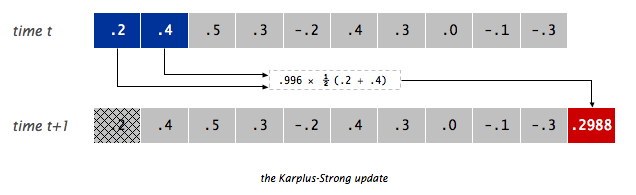
Simulate the plucking of a guitar string. When a guitar string is plucked, the string vibrates and creates sound. The length of the string determines its fundamental frequency of vibration. We model a guitar string by sampling its displacement (a real number between -1/2 and +1/2) at N equally spaced points (in time), where N equals the sampling rate (44,100) divided by the fundamental frequency (rounding the quotient to the nearest integer).
Why it works? The two primary components that make the Karplus-Strong algorithm work are the ring buffer feedback mechanism and the averaging operation.
Ring buffer. Your first task is to create a data type to model the ring buffer. Write a class named RingBuffer that implements the following API:
public class RingBuffer
-----------------------------------------------------------------------------------------
        RingBuffer(int capacity)  // create an empty ring buffer, with given max capacity
    int size()                    // return number of items currently in the buffer
boolean isEmpty()                 // is the buffer empty (size equals zero)?
boolean isFull()                  // is the buffer full  (size equals capacity)?
   void enqueue(double x)         // add item x to the end
 double dequeue()                 // delete and return item from the front
 double peek()                    // return (but do not delete) item from the front
Since the ring buffer has a known maximum capacity, implement it using
a double array of that length. For efficiency, use
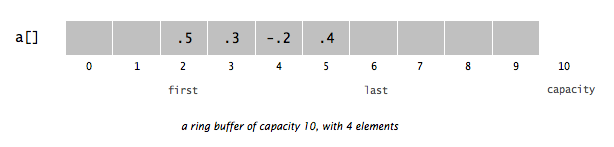
cyclic wrap-around: Maintain one integer instance variable
first that stores the index of the least recently inserted
item; maintain a second integer instance variable last that
stores the index one beyond the most recently inserted item. To
insert an item, put it at index last and increment
last. To remove an item, take it from index first
and increment first. When either index equals
capacity, make it wrap-around by changing the index to
0.
Implement RingBuffer to throw an exception if the client attempts to dequeue() or peek() from an empty buffer or enqueue() into a full buffer.
Guitar string. Next, create a data type to model a vibrating guitar string. Write a class named GuitarString that implements the following API:
public class GuitarString
------------------------------------------------------------------------------------------------------------------------
       GuitarString(double frequency)  // create a guitar string of the given frequency, using a sampling rate of 44,100
       GuitarString(double[] init)     // create a guitar string whose size and initial values are given by the array
  void pluck()                         // set the buffer to white noise
  void tic()                           // advance the simulation one time step
double sample()                        // return the current sample
   int time()                          // return number of tics
Interactive guitar player. GuitarHeroLite.java is a sample GuitarString client that plays the guitar in real-time, using the keyboard to input notes. When the user types the lowercase letter 'a' or 'c', the program plucks the corresponding string. Since the combined result of several sound waves is the superposition of the individual sound waves, we play the sum of all string samples.
Write a program GuitarHero.java that is similar to GuitarHeroLite, but supports a total of 37 notes on the chromatic scale from 110Hz to 880Hz. In general, make the ith character of the string
public class GuitarHeroLite {

    public static void main(String[] args) {
	int    DRAW_SAMPLE_RATE = 20;    // draw at a rate of 20/sec
	int    AUDIO_PER_DRAW   = StdAudio.SAMPLE_RATE / DRAW_SAMPLE_RATE;

	int    PLAY_TIME        = 10;    // target 60 seconds display window
	int    XWIDTH           = DRAW_SAMPLE_RATE * PLAY_TIME;

        // Create two guitar strings, for concert A and C
        double CONCERT_A = 440.0;
        double CONCERT_C = CONCERT_A * Math.pow(2, 3.0/12.0);
        GuitarString stringA = new GuitarString(CONCERT_A);
        GuitarString stringC = new GuitarString(CONCERT_C);

        // Set up parameters for visualization
	StdDraw.setCanvasSize(768, 256);
	StdDraw.setPenColor(StdDraw.RED);
	StdDraw.setXscale(0, XWIDTH);
	StdDraw.setYscale(-1, 1);

	// fence post
	double xprev = 0, yprev = 0;

        // the main input loop
        while (true) {

            // check if the user has typed a key, and, if so, process it
            if (StdDraw.hasNextKeyTyped()) {

                // the user types this character
                char key = StdDraw.nextKeyTyped();

                // pluck the corresponding string
                if (key == 'a') { stringA.pluck(); }
                if (key == 'c') { stringC.pluck(); }
            }

	    // compute the superposition of the samples for duration
	    double sample = stringA.sample() + stringC.sample();

	    // send the result to standard audio
	    StdAudio.play(sample);

	    // advance the simulation of each guitar string by one step
	    stringA.tic();
	    stringC.tic();

	    // Decide if we need to draw.
	    //   Audio sample rate is StdAudio.SAMPLE_RATE per second
	    //   Draw sample rate is DRAW_SAMPLE_RATE
	    //   Hence, we draw every StdAudio.SAMPLE_RATE / DRAW_SAMPLE_RATE
	    if (stringA.time() % AUDIO_PER_DRAW == 0) {
		StdDraw.line(xprev, yprev, xprev+1, sample);
		xprev ++;
		yprev = sample;
		// XXX check if wrapped around
	    } // end of if

	} // end of while

    } // end of main

} // end of class
This keyboard arrangement imitates a piano keyboard: The "white keys" are on the qwerty and zxcv rows and the "black keys" on the 12345 and asdf rows of the keyboard.String keyboard = "q2we4r5ty7u8i9op-[=zxdcfvgbnjmk,.;/' ";
The ith character of the string corresponds to a frequency of 440 × 2(i - 24) / 12, so that the character 'q' is 110Hz, 'i' is 220Hz, 'v' is 440Hz, and ' ' is 880Hz. Don't even think of including 37 individual GuitarString variables or a 37-way if statement! Instead, create an array of 37 GuitarString objects and use keyboard.indexOf(key) to figure out which key was typed. Make sure your program does not crash if a key is played that is not one of your 37 notes.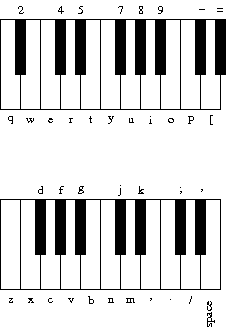
Note that GuitarHeroLite displays sound wave, but will not wrap around. In other words, after a while you can no longer see the sound wave. You will need to wrap the wave around, by calling the clear() method of StdDraw when the wave has reached the boundary.
These are purely suggestions for how you might make progress. You do not have to follow these steps.
public class RingBuffer {
    private double[] rb;          // items in the bufer
    private int first;            // rb[first]  = first item in the buffer
    private int last;             // rb[last-1] = last  item in the buffer
    private int size;             // current number of items in the buffer
}
Testing. Be sure to thoroughly test each piece of your code as you write it. We offer some suggestions below.
  public static void main(String[] args) {
      int N = Integer.parseInt(args[0]);
      RingBuffer buffer = new RingBuffer(N);
      for (int i = 1; i <= N; i++) {
          buffer.enqueue(i);
      }
      double t = buffer.dequeue();
      buffer.enqueue(t);
      System.out.println("Size after wrap-around is " + buffer.size());
      while (buffer.size() >= 2) {
          double x = buffer.dequeue();
          double y = buffer.dequeue();
          buffer.enqueue(x + y);
      }
      System.out.println(buffer.peek());
  }
% java RingBuffer 10
Size after wrap-around is 10
55.0


% java RingBuffer 100
Size after wrap-around is 100
5050.0
  public static void main(String[] args) {
      int N = Integer.parseInt(args[0]);
      double[] samples = { .2, .4, .5, .3, -.2, .4, .3, .0, -.1, -.3 };
      GuitarString testString = new GuitarString(samples);
      for (int i = 0; i < N; i++) {
          int t = testString.time();
          double sample = testString.sample();
          System.out.printf("%6d %8.4f\n", t, sample);
          testString.tic();
      }
  }
% java GuitarString 25
     0   0.2000
     1   0.4000
     2   0.5000
     3   0.3000
     4  -0.2000
     5   0.4000
     6   0.3000
     7   0.0000
     8  -0.1000
     9  -0.3000
    10   0.2988
    11   0.4482
    12   0.3984
    13   0.0498
    14   0.0996
    15   0.3486
    16   0.1494
    17  -0.0498
    18  -0.1992
    19  -0.0006
    20   0.3720
    21   0.4216
    22   0.2232
    23   0.0744
    24   0.2232
                                              w q q
        8       u       7       y             o p p
i p z v b z p b n z p n d [ i d z p i p z p i u i i
What is this familiar melody (S = space)?
nn//SS/ ..,,mmn //..,,m //..,,m nn//SS/ ..,,mmn
You finish by making sure that GuitarHero plots the sound wave in real-time, as the user is playing the keyboard guitar. The output should look something like this, but change over time.
All you need to submit electronically for PS9 are the RingBuffer.java file, the GuitarString.java file, the GuitarHero.java file, and the README.txt file. Please use the template of README.txt.
    //*******************************************************************
    //
    //   File: FileName.java          Assignment No.: 9
    //
    //   Author: <your name>      Email: <your email>
    //
    //   Class: ClassName
    //
    //   Time spent on this problem:
    //   --------------------
    //      Please give a description about your design.
    //
    //
    //   Report file name:
    //*******************************************************************
The submission repository for ps9 is https://gitee.com/simmonsong/ct-xmuf25-ps9.
Please follow the instructions in Assignments Submission to submit your assignments.
Git introduction is a help document for git utilization..
Good luck and enjoy!
Some references: